

In Part 4, we built a RAG knowledge base with vector stores, embeddings, and document processing. It works — ask a question, get an answer grounded in your documents. But “works” and “works well” are different things.
Think about the last time you used your company’s internal search. You typed a question, got 50 results, and none of them answered what you actually asked. Or worse — the right answer was there, buried at result #37.
This project fixes that. Hybrid retrieval that combines semantic understanding with exact keyword matching. Reranking that puts the best results first, not just the most similar. Query expansion that finds what you meant, not just what you typed. And evaluation metrics that tell you exactly how good your search is — so you stop guessing and start measuring.
The Problem
Your knowledge base from Part 4 can find relevant documents. But “relevant” and “the right answer” aren’t the same thing.
Pure vector search has a blind spot. It’s great at semantic similarity — “deployment process” matches “release pipeline” even though they share no words. But it misses exact terms. Search for “PgBouncer” and vector search returns results about database connections in general, not the specific tool you asked about.
Keyword search has the opposite problem. It finds exact matches but misses meaning. “How do I ship code to production?” returns nothing if your runbook says “deployment process” instead of “ship code.”
This is why enterprise search feels broken. Most systems use one approach or the other. You need both. And you need a way to measure which approach actually works better — not just “it looks right” but real metrics like MRR and NDCG.
The Pattern
Expand → Embed → Search (vector + keyword) → Rerank → Generate → Evaluate
Article 4 was: embed → search → generate. This project adds query intelligence on the front end, hybrid search and reranking in the middle, and quality measurement on the back end.
Architecture
The system has two flows: the search pipeline that processes queries, and the evaluation framework that measures quality.
Search Pipeline — queries flow through expansion, embedding, hybrid search, reranking, and generation.
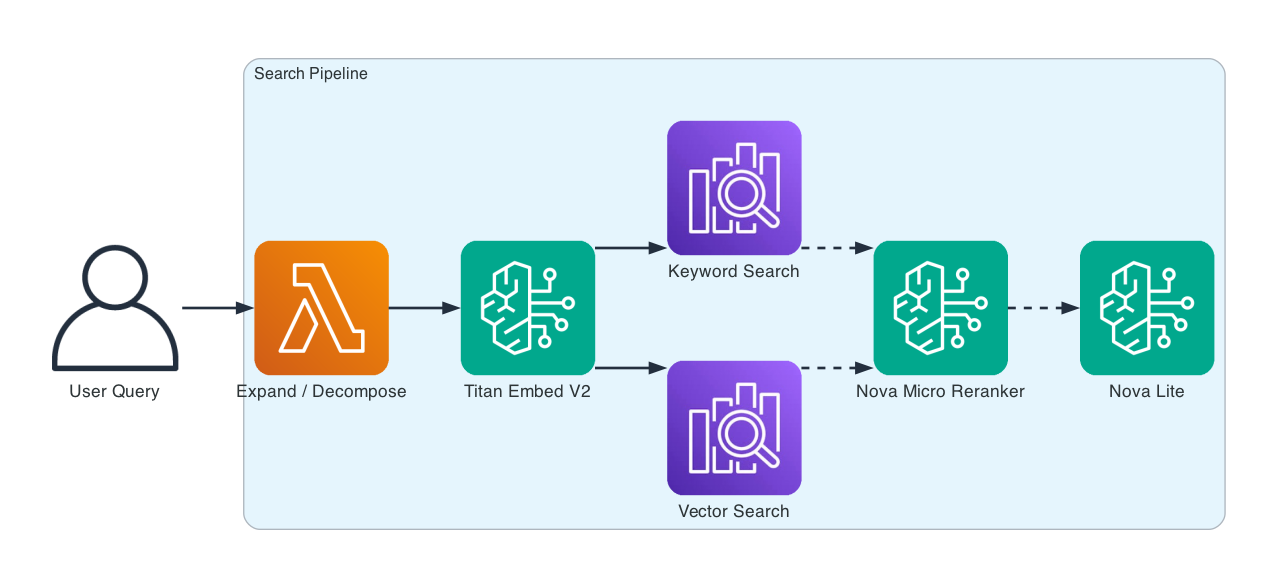
The evaluation framework runs test queries with known relevant documents through the pipeline and scores results with MRR, NDCG, Precision@K, and Recall@K.
How It Works
Six phases. Each one adds a layer of intelligence to the basic vector search from Article 4.
Phase 1: Chunking Comparison. Three strategies side by side — fixed-size (512 chars with overlap), hierarchical (split by headings then paragraphs), and semantic (respect natural boundaries). The same corpus produces very different chunk distributions:
Strategy               Chunks   Avg Size    Min    Max
fixed-512                  69        162      1    512
hierarchical               26        345    192    614
semantic                   14        643    240    796
Fixed-size produces 69 tiny fragments. Hierarchical splits by section titles and keeps each title with its content — 26 mid-sized chunks. Semantic respects natural paragraph boundaries — 14 coherent sections. More chunks isn’t better — it means more noise in retrieval.
Phase 2: Embedding Benchmark. Amazon Titan Embed V2 converts text to 1024-dimensional vectors. We measure latency (244ms average) and check that semantically related texts produce similar vectors while unrelated texts don’t.
The similarity matrix confirms the model understands meaning — deployment and database content score low (unrelated), while onboarding and architecture content score higher (both about engineering processes).
Phase 3: Hybrid Search. This is the core upgrade from Article 4. Instead of pure vector search, we combine 75% vector similarity with 25% keyword matching. The keyword component catches exact terms that vector search might miss.
Query: "How do I deploy to production?"
Weights: vector=0.75, keyword=0.25

[1] (0.5597) We deploy to production twice a day — 10 AM and 3 PM Central...
[2] (0.4505) A bad deployment took down the checkout flow for 45 minutes...
[3] (0.4303) Clone the main monorepo from GitHub. You'll need access to...
The top result scores 0.56 — a strong match. The canary deployment ADR is second because it’s also about deployments. The keyword component boosted both because they contain “deploy.”
Phase 4: Reranking. Hybrid search gets the right documents into the top-K. Reranking puts them in the right order. We use Nova Micro to score each result’s relevance to the query on a 0-10 scale.
Reranked results:
[1] (0.90) We deploy to production twice a day — 10 AM and 3 PM Central...
[2] (0.80) A bad deployment took down the checkout flow for 45 minutes...
[3] (0.30) Clone the main monorepo from GitHub...
[4] (0.30) The monolith was becoming difficult to deploy and scale...
[5] (0.20) Production database access requires a VPN connection...
After reranking, the deployment process passage scores 0.90 while database access drops to 0.20. The model understands relevance better than cosine similarity alone.
Phase 5: Query Processing. Simple queries get expanded into related searches. Complex queries get decomposed into sub-questions.
Simple: "deployment process"
→ "deployment process"
→ "automation in deployment workflows"
→ "steps involved in application rollout"
→ "software release management procedures"

Complex: "Compare our deployment process with our database backup strategy"
→ "What are the key steps in our deployment process?"
→ "What are the key components of our database backup strategy?"
→ "How do they compare in efficiency and reliability?"
Expansion catches different phrasings. Decomposition breaks multi-part questions into answerable pieces.
Phase 6: Evaluation. This is how you know your search actually works. Five test queries with known relevant passages, scored on four metrics:
Query                                            MRR   NDCG    P@5    R@5
How do I deploy to production?                 1.000  0.854  0.800  0.364
What database do we use and why?               1.000  1.000  1.000  0.556
What should I do when API latency spikes?      1.000  1.000  1.000  0.455
How does our caching strategy work?            1.000  0.616  0.600  0.429
How do I set up my local dev environment?      1.000  0.920  0.400  1.000
AVERAGE                                        1.000  0.878  0.760  0.560
MRR of 1.0 means the most relevant result is always ranked first. NDCG of 0.878 means the overall ranking quality is strong. These are real metrics from real internal docs — not toy examples.
Evaluation Metrics — What They Mean
Before diving into the metrics, one concept to understand: Top-K. When you search, you don’t look at every result — you look at the top 5 or top 10. K is that number. Top-5 means “the 5 best results the system returned.” All the metrics below are measured against this top-K set.
MRR (Mean Reciprocal Rank) — Is the best answer at the top? If the right result is always #1, MRR is 1.0. If it’s usually #2, MRR is 0.5. Simple: higher is better.
NDCG (Normalized Discounted Cumulative Gain) — Are ALL the good results near the top? MRR only cares about the first hit. NDCG checks whether the second, third, and fourth relevant results are also ranked high — not buried at the bottom.
Precision@K — How much junk is in your results? If you ask for 5 results and 3 are relevant, Precision@5 is 0.60. The other 2 were noise.
Recall@K — Did you miss anything important? If there are 10 relevant docs in your knowledge base and 9 of them appear in your top-K, Recall is 0.90. The one you missed might have been the answer someone needed.
What Changed from Article 4
| Concept | Article 4 (Knowledge Base) | Article 5 (This Project) |
|---|---|---|
| Search | Pure vector (cosine similarity) | Hybrid (75% vector + 25% keyword) |
| Ranking | Single-pass similarity score | Two-pass: similarity then reranking |
| Query handling | Direct embedding | Expansion for simple, decomposition for complex |
| Chunking | Semantic only | Three strategies compared with metrics |
| Evaluation | None — “it looks right” | MRR, NDCG, Precision@K, Recall@K |
| Reranking | None | Nova Micro relevance scoring |
Getting Started
Prerequisites: Python 3.10+, AWS CLI configured, Bedrock model access for Titan Embed V2, Nova Lite, and Nova Micro.
git clone https://github.com/srikanthethiraj/advanced-search-retrieval.git
cd advanced-search-retrieval
python3 -m venv venv
source venv/bin/activate
pip install -r requirements.txt
Run the demo:
python demo.py --region us-east-1
You’ll see all six phases — chunking comparison, embedding benchmark, hybrid search, reranking, query processing, and evaluation metrics.
Tear Down
No infrastructure to tear down — this project runs entirely against Bedrock APIs with in-memory search. No OpenSearch domain, no DynamoDB table, no CloudFormation stack.
What’s Next
This is Part 5 of an 8-part series on building AI applications with AWS:
- Part 1 — Insurance Claim Processor: Bedrock basics, prompt templates, simple RAG
- Part 2 — Financial Services AI Assistant: benchmarking, circuit breakers, cross-region resilience
- Part 3 — Customer Feedback Pipeline: multimodal data processing
- Part 4 — RAG Knowledge Base: vector stores, embeddings, document chunking
- Part 5 — Advanced Search & Retrieval (this post): hybrid search, reranking, query expansion
- Part 6 — AI Support Assistant with Governance: guardrails, prompt management, conversation flows
- Part 7 — Multi-Agent Support System: Strands Agents, multi-agent orchestration
- Part 8 — Deploy AI Agents on AWS: Bedrock Agents vs AgentCore
Repository: github.com/srikanthethiraj/advanced-search-retrieval
I’m Srikanth — a cloud engineer at AWS based in Austin, Texas. I learn by building, and I write about what I build. Follow along on this blog or connect with me on LinkedIn.
Comments