

In Part 3, we built a pipeline that processes text, images, audio, and surveys. All of it fed into a single Bedrock call for analysis. But the knowledge behind that analysis was baked into the prompt — no persistent memory, no document retrieval.
Your engineering team has hundreds of internal docs — runbooks, architecture decisions, onboarding guides, API references. They’re scattered across Confluence, GitHub wikis, and shared drives. New hires spend weeks finding answers that already exist. Senior engineers answer the same questions over and over.
This project builds an internal knowledge base that actually understands what you’re asking. Not keyword search. Semantic search — where “how do I ship code to production?” finds the deployment runbook, even though it says “deploy” instead of “ship.”
The Problem
Every growing engineering team hits this wall. The knowledge exists, but nobody can find it.
In Part 1, our knowledge base was a Python dictionary:
kb = PolicyKnowledgeBase()
kb.add_policy("POL-2024-78432", "Coverage: $500,000. Deductible: $1,000.")
Three policies. Exact key match. No semantic understanding. Ask “what’s my deductible?” and it has no idea — because it only matches on policy number, not meaning.
That’s how most internal search works today. Exact keyword matching. If the runbook says “deployment process” and you search “how do I ship code,” you get nothing.
Real knowledge bases need to understand what you’re asking, search across thousands of documents, and find the relevant passages — even when the wording doesn’t match exactly. That’s what vector search and embeddings solve.
The Pattern
Extract → Chunk → Embed → Index → Query → Maintain
Same pattern whether you’re building a documentation assistant, a legal research tool, or a customer support bot. The data sources change. The pipeline doesn’t.
Architecture
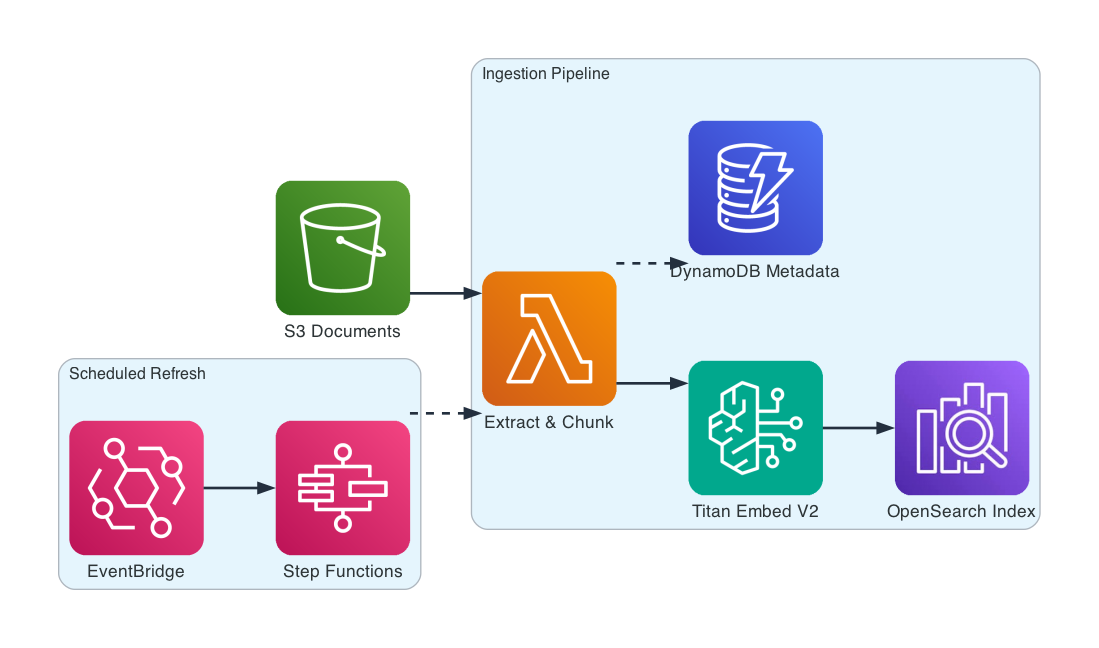
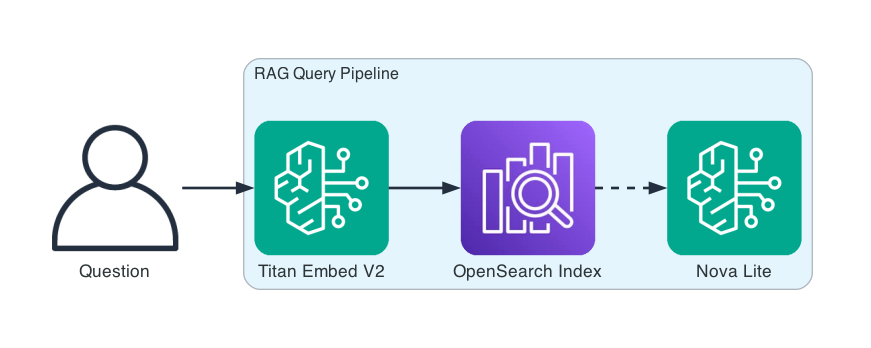
The system has two paths: ingestion (documents in) and query (answers out).
Ingestion Pipeline — documents flow through extraction, chunking, and embedding into a vector index. EventBridge + Step Functions handle scheduled refresh.
Query Pipeline — questions flow through embedding, vector search, and generation. The same Titan Embed V2 model embeds both documents and queries so they live in the same vector space.
How It Works
Seven steps. Documents flow through extraction, chunking, and embedding into a vector index. Queries flow through embedding, retrieval, and generation.
Extract. Documents are uploaded to S3. A processor downloads each file, detects the type (PDF, DOCX, TXT), extracts clean text, and computes a SHA-256 checksum. The checksum is the key to change detection — if a document hasn’t changed since last ingestion, we skip it entirely.
Chunk. Raw text is split into meaningful segments. Not arbitrary 512-character blocks — semantic chunking that respects paragraph boundaries, section headings, and sentence structure. Each chunk is 100-1000 characters, sized for embedding quality without losing context.
Embed. Amazon Titan Embed V2 converts each chunk into a 1024-dimensional vector. These vectors capture semantic meaning — “deployment process” and “how to ship code to production” end up close together in vector space, even though they share no words.
Index. Vectors are bulk-indexed into OpenSearch using the HNSW algorithm for approximate nearest-neighbor search. Each document in the index carries the original text, document ID, chunk position, and metadata. This is the searchable knowledge base.
Track. DynamoDB stores a record for every ingested document: its S3 key, checksum, chunk count, and timestamps. When the pipeline runs again, it checks the checksum first. Changed documents get re-processed. Unchanged ones are skipped. This makes incremental updates fast.
Query. A user question goes through the same embedding model, producing a query vector. OpenSearch finds the k most similar chunks by cosine similarity. Those chunks become the context for Nova Lite, which generates an answer grounded in the retrieved passages.
Refresh. EventBridge triggers a Step Functions workflow on a schedule. The workflow scans all tracked documents, re-downloads from S3, checks checksums, and only re-processes what’s changed. No manual intervention needed.
Semantic Chunking — Why It Matters
Fixed-size chunking is simple: split every 512 characters, overlap by 50. But it cuts through sentences, separates headings from their content, and produces chunks that don’t make sense on their own.
Semantic chunking respects document structure. It splits on double newlines (paragraph boundaries) and section headings. If a section is too long, it falls back to sentence boundaries. If a trailing fragment is too short, it merges into the previous chunk.
The difference shows up in retrieval quality. A query about “how do I deploy to production?” should retrieve the paragraph about the deployment process — not half of that paragraph and half of the database access section.
chunker = create_chunker("semantic", max_chunk_size=800)
chunks = chunker.chunk(text, document_id="onboarding-guide")
# 4 chunks, each a coherent section of the guide
Embeddings — Turning Text into Vectors
Amazon Titan Embed V2 is the embedding model. It takes text and returns a 1024-dimensional vector that captures semantic meaning.
Two texts about the same concept produce similar vectors, even with different wording. This is what makes semantic search possible — you don’t need exact keyword matches.
Query: "How do I deploy to production?"

Top match (score: 0.5796):
  "We deploy to production twice a day — 10 AM and 3 PM Central.
   All changes go through the standard PR review process. At least
   two approvals are required, and CI must pass. The deployment
   pipeline runs in three stages: staging, canary, and full rollout."

Second match (score: 0.3386):
  "Engineering Onboarding Guide — Welcome to the engineering team.
   This guide covers everything you need to get productive..."
The deployment chunk scores 0.58. The general onboarding overview scores 0.34. Unrelated content (Redis caching, database alerts) scores below 0.20. The embedding model understands what the question is really asking.
Change Detection — The Maintenance Problem
Ingesting documents once is easy. Keeping them current is the real challenge.
Every document gets a SHA-256 checksum stored in DynamoDB. When the refresh pipeline runs, it downloads each document, computes the new checksum, and compares. If the checksum matches, the document is skipped — no re-chunking, no re-embedding, no re-indexing.
If the checksum differs, the pipeline deletes the old vectors from OpenSearch and re-processes the document from scratch. This handles both content updates and structural changes (like a PDF being reformatted).
🔄 CHANGE DETECTION (re-ingest)
   documents/onboarding-guide.txt: unchanged
   documents/architecture-decisions.txt: unchanged
   documents/ops-runbook.txt: unchanged
Three documents checked. Zero re-processed. The pipeline ran in seconds instead of minutes.
RAG Query — Retrieval Meets Generation
The query engine combines vector search with foundation model generation. It’s two steps: find the relevant context, then generate an answer using that context.
Q: How do I deploy to production?
A: We deploy to production twice a day — 10 AM and 3 PM Central.
   All changes go through the standard PR review process with at
   least two approvals required. The deployment pipeline runs in
   three stages: staging, canary (10% traffic for 30 minutes),
   and full rollout...
   Sources: 5 chunks, latency: 1322ms

Q: What database do we use and why?
A: We use PostgreSQL with RDS as the primary database. It supports
   JSON columns for flexible schemas, has strong indexing capabilities,
   and the team has deep expertise. Connection pooling uses PgBouncer
   with a max of 200 connections per instance.
   Sources: 5 chunks, latency: 713ms

Q: What should I do when API latency spikes?
A: Check the API Latency dashboard in Datadog to identify which
   service and endpoint is slow. Then check the Database Connection
   Pool dashboard — if connections are near the max (200), the
   database is the bottleneck. Also check Redis Cache Hit Rate.
   Sources: 5 chunks, latency: 850ms
Every answer is grounded in retrieved passages. The model doesn’t hallucinate — it synthesizes from the context it was given. If the context doesn’t contain the answer, it says so.
What Changed from Part 1
| Concept | Part 1 (Insurance Claim Processor) | Part 4 (This Project) |
|---|---|---|
| Knowledge base | PolicyKnowledgeBase — Python dict |
OpenSearch vector store with k-NN |
| Embeddings | None — exact key match | Amazon Titan Embed V2 (1024d) |
| Document processing | Hardcoded strings | PDF, DOCX, TXT extraction |
| Chunking | None — full document as value | Semantic chunking with section awareness |
| Change detection | None | SHA-256 checksums in DynamoDB |
| Retrieval | dict.get(policy_number) |
Cosine similarity search across all documents |
| Maintenance | Manual restart | Scheduled refresh via EventBridge + Step Functions |
The PolicyKnowledgeBase from Part 1 was 20 lines of Python. This project is the production version of the same idea — real vector search, real embeddings, real document management.
Getting Started
Prerequisites: Python 3.10+, AWS CLI configured, Bedrock model access for Titan Embed V2 and Nova Lite.
git clone https://github.com/srikanthethiraj/rag-knowledge-base.git
cd rag-knowledge-base
python3 -m venv venv
source venv/bin/activate
pip install -r requirements.txt
Run the local demo first — it tests extraction, chunking, and embeddings without needing OpenSearch:
python demo.py --local --region us-east-1
Use whichever region you have Bedrock model access enabled in.
You’ll see documents extracted, chunks created, embeddings generated, and an in-memory similarity search that proves the vectors work.
Deploy to AWS
For the full pipeline with OpenSearch and DynamoDB:
./deploy.sh YOUR_BUCKET us-east-1
Wait about 10 minutes for the OpenSearch domain to provision, then run the full demo:
python demo.py \
  --bucket YOUR_BUCKET \
  --opensearch-host YOUR_OPENSEARCH_ENDPOINT \
  --region us-east-1
The full demo ingests all sample documents, runs three RAG queries, and demonstrates change detection on re-ingest.
Tear Down
aws cloudformation delete-stack --stack-name rag-knowledge-base-prod --region us-east-1
What’s Next
This is Part 4 of an 8-part series on building AI applications with AWS:
- Part 1 — Insurance Claim Processor: Bedrock basics, prompt templates, simple RAG
- Part 2 — Financial Services AI Assistant: benchmarking, circuit breakers, cross-region resilience
- Part 3 — Customer Feedback Pipeline: multimodal data processing
- Part 4 — RAG Knowledge Base (this post): vector stores, embeddings, document chunking
- Part 5 — Advanced Search & Retrieval: hybrid search, reranking, query expansion
- Part 6 — AI Support Assistant with Governance: guardrails, prompt management, conversation flows
- Part 7 — Multi-Agent Support System: Strands Agents, multi-agent orchestration
- Part 8 — Deploy AI Agents on AWS: Bedrock Agents vs AgentCore
Repository: github.com/srikanthethiraj/rag-knowledge-base
I’m Srikanth — a cloud engineer at AWS based in Austin, Texas. I learn by building, and I write about what I build. Follow along on this blog or connect with me on LinkedIn.
Comments