

Insurance companies process thousands of claims every day. An analyst reads a document, types fields into a form, writes a summary, moves on. It’s slow, repetitive, and error-prone.
I built a system that does all of this in seconds using Python and Amazon Bedrock. This is Part 1 of an 8-part hands-on series on building AI applications with AWS.
The Problem
Manual claim processing is a grind. Reading a single document takes 5-10 minutes. Typing fields into a form introduces typos. Writing a summary takes another 5-10 minutes. Multiply that by hundreds of claims per day.
Missing fields slip through. Sensitive data like SSNs end up in reports. It’s not sustainable.
The Pattern
This project teaches a pattern that applies far beyond insurance:
Unstructured data → AI extraction → Validation → Enrichment → Structured output
Same approach works for medical records, legal contracts, invoices, support tickets, resumes. Once you get it, you can apply it anywhere.
Architecture
The system is a five-component pipeline. Each component has a single job. The orchestrator wires them together.
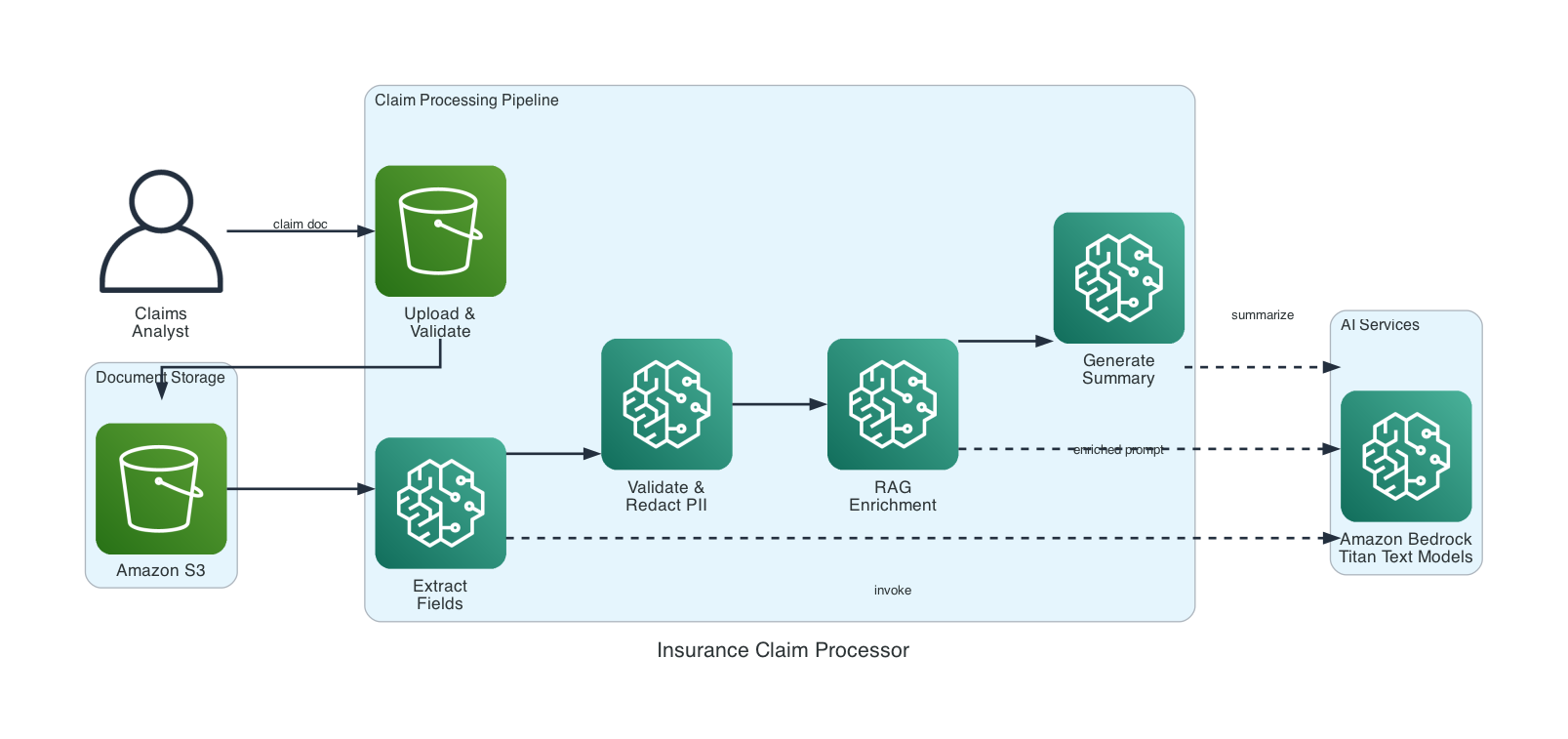
- Prompt Template Manager — reusable prompts with variable substitution
- Model Invoker — Bedrock calls with retry and latency tracking
- Content Validator — missing field checks + PII redaction
- RAG Component — policy context enrichment
How the Pipeline Works
Five steps, each building on the last.
Upload. The claim document goes to S3 with a unique timestamped key. Format validation (PDF, PNG, JPEG, TXT) and a 10 MB size limit are enforced before upload.
Extract. Document text is sent to Amazon Bedrock with an extraction prompt. The AI returns structured fields: claimant name, date, amount, description, policy number. If a field can’t be found, it’s marked "not found" — never guessed.
Validate. Extracted fields are checked for completeness. Text is scanned for sensitive patterns — SSNs, credit card numbers, bank accounts — and matches are replaced with [REDACTED].
Enrich. This is where RAG comes in. The system looks up the policy number in a knowledge base and feeds that context back to the AI. Without RAG, the AI only sees the claim. With RAG, it also knows coverage type, deductible, and limits.
Summarize. The AI generates a plain-language summary capped at 300 words. If summarization fails, you still get the extracted fields. The system never loses data.
Key Implementation Details
Prompt templates use {variable} placeholders filled at runtime. The manager validates that all required variables are provided before rendering — no silent failures.
Model invocation includes exponential backoff with jitter on throttling. Three retries before giving up. Latency is tracked on every call.
PII redaction uses regex patterns for SSNs (\d{3}-\d{2}-\d{4}), credit cards, and bank account numbers. Patterns are applied to all extracted field values before they leave the system.
RAG enrichment is a simple Python dictionary in this first project. Article 4 in the series replaces it with real vector stores and embeddings using Amazon OpenSearch.
Example Output
Processing a water damage claim produces:
Extracted Fields:
  Claimant:    Sarah Chen
  Date:        2024-11-03
  Amount:      $15,200.00
  Policy:      POL-2024-78432
  Description: Pipe burst in upstairs bathroom...

Validation:
  Status: pass
  Missing fields: none
  Redacted fields: none
The AI-generated summary includes policy context from the RAG step — coverage type and deductible — without the analyst having to look it up separately.
If the document contained a Social Security number, the system would catch it:
Original:  "SSN: 123-45-6789"
After:     "SSN: [REDACTED]"
Model Comparison
You can run the same claim through multiple models side-by-side:
Model                                    Latency     Output     Status
amazon.nova-lite-v1:0                      705ms  539 chars         OK
amazon.nova-micro-v1:0                     517ms  527 chars         OK
Nova Lite gives more detailed output. Nova Micro is faster and cheaper. This comparison helps you pick the right model for production.
Getting Started
Prerequisites: Python 3.10+, an AWS account with Bedrock access, AWS CLI configured.
git clone https://github.com/srikanthethiraj/insurance-claim-processor.git
cd insurance-claim-processor
python3 -m venv venv
source venv/bin/activate
pip install -r requirements.txt
Before running, enable model access in the AWS Console: Amazon Bedrock → Model access → enable Nova Lite and Nova Micro. Create an S3 bucket:
aws s3 mb s3://your-bucket-name --region us-east-1
Run the demo:
python3 demo.py --bucket your-bucket-name
You’ll see the full pipeline — upload, extract, validate, summarize, and compare.
What’s Next
This is Part 1 of an 8-part series on building AI applications with AWS:
- Part 1 — Insurance Claim Processor (this post): Bedrock basics, prompt templates, simple RAG
- Part 2 — Financial Services AI Assistant: benchmarking, circuit breakers, cross-region resilience
- Part 3 — Customer Feedback Pipeline: multimodal data processing
- Part 4 — RAG Knowledge Base: vector stores, embeddings, document chunking
- Part 5 — Advanced Search & Retrieval: hybrid search, reranking, query expansion
- Part 6 — AI Support Assistant with Governance: guardrails, prompt management, conversation flows
- Part 7 — Multi-Agent Support System: Strands Agents, multi-agent orchestration
- Part 8 — Deploy AI Agents on AWS: Bedrock Agents vs AgentCore
Repository: github.com/srikanthethiraj/insurance-claim-processor
I’m Srikanth — a cloud engineer at AWS based in Austin, Texas. I learn by building, and I write about what I build. Follow along on this blog or connect with me on LinkedIn.
Comments