

In Part 2, we built a financial services AI assistant with benchmarking, circuit breakers, and cross-region resilience. All of it processed one data type: text.
Real customer feedback doesn’t come in one format. It arrives as written reviews, photos of damaged products, phone call recordings, and survey responses. This project builds a pipeline that handles all of them — validates the data, routes each type to the right AWS AI service, and feeds everything into Amazon Nova Lite for unified analysis.
The Problem
Most AI demos work with clean text. Real customer feedback is messy. A retail company might receive an email complaint, a photo of a broken item, a voicemail, and a post-purchase survey — all about the same product issue.
Part 1’s ContentValidator checked for missing fields and redacted PII. That’s fine for structured text. But what do you do with an image? An audio file? A survey with Likert scales and free-text comments?
You need a pipeline that validates data quality across all types, routes each record to the right processor, and brings everything together for analysis.
The Pattern
This project teaches a pattern for handling diverse data types in AI applications:
Ingest → Validate → Route → Process per modality → Format → Analyze
Same approach works for medical intake (forms, X-rays, doctor notes), insurance claims (documents, photos, phone calls), or product reviews (text, images, video). The modalities change. The pattern doesn’t.
Architecture
The pipeline follows a processor-per-modality design. Each data type gets its own processor backed by a purpose-built AWS AI service. Results converge into a single Bedrock Converse API call for unified analysis.
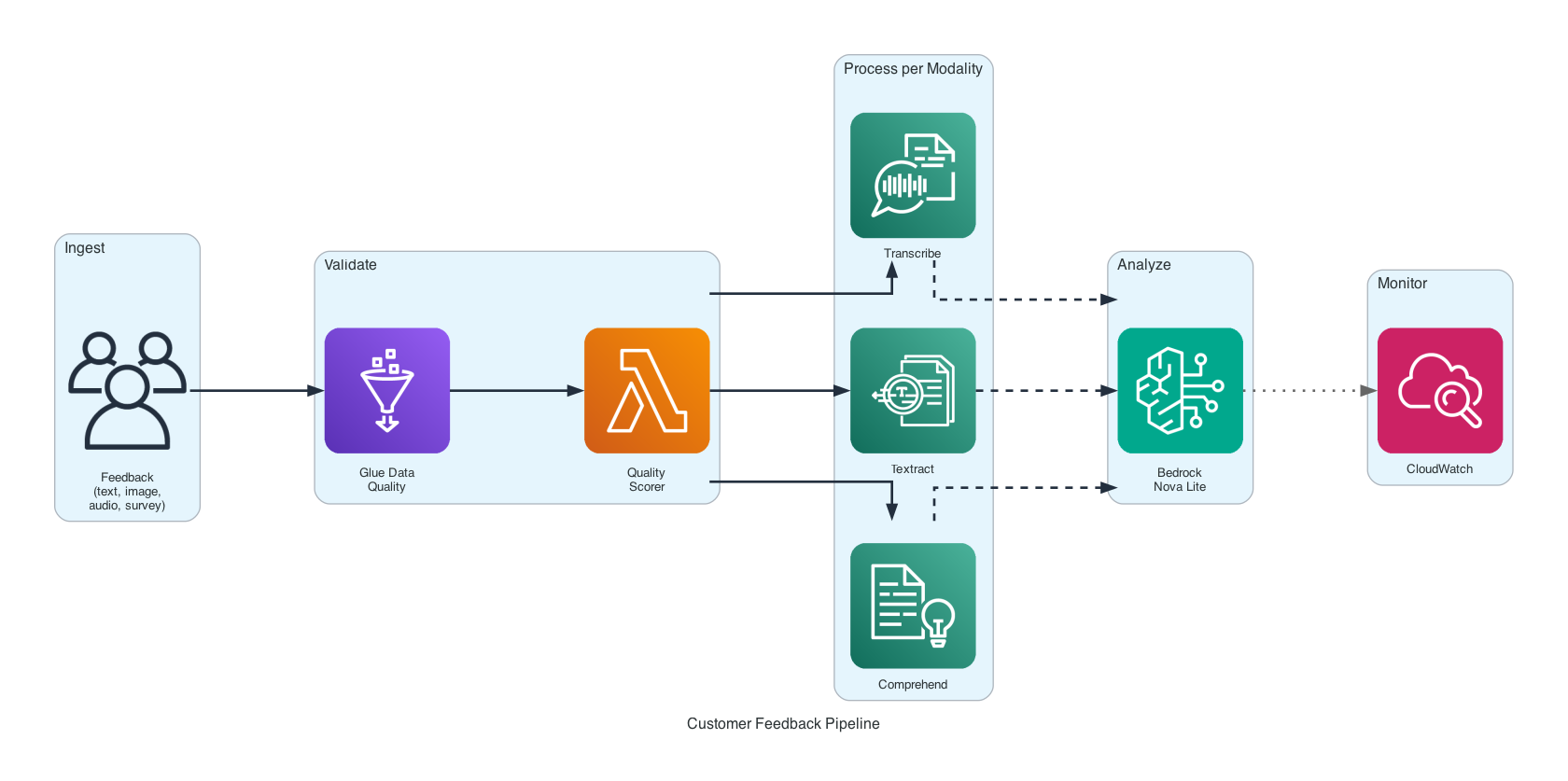
Key components:
- Data Validator — Glue Data Quality rules for completeness, uniqueness, freshness
- Quality Scorer — Lambda function for text-specific quality scoring
- Text Processor — Amazon Comprehend for entity extraction and sentiment analysis
- Image Processor — Amazon Textract for text extraction, Rekognition for label detection
- Audio Processor — Amazon Transcribe for speech-to-text with speaker labels
- Survey Processor — SageMaker Processing for survey data transformation
- Bedrock Formatter — Converts all processing results into Converse API messages
- Quality Monitor — CloudWatch metrics, dashboards, and alarms
How the Pipeline Works
Eight steps. Each record flows through validation, gets routed by type, processed by the right service, and fed into Bedrock for analysis.
Ingest. Feedback records are built from sample data — text reviews and survey responses defined in code, plus image and audio files discovered automatically from samples/images/ and samples/audio/. Each record has a customer ID, timestamp, channel, and the payload.
Validate. Every record passes through Glue Data Quality rules. Three checks: completeness (all required fields present), uniqueness (no duplicate record IDs in the batch), and freshness (timestamp within the last 90 days). Records that fail are flagged and skipped.
Score. Text records that pass structural validation get an additional quality check. A Lambda function scores text on length, word count, and content quality. Short or empty reviews get filtered out before they waste model invocations.
Route. Valid records are directed to the appropriate processor based on their data_type field. Text goes to Comprehend. Images go to Textract and Rekognition. Audio goes to Transcribe. Surveys go to SageMaker Processing.
Process. Each processor extracts structured information from its modality:
- Text → entities (people, organizations, dates) and sentiment (positive, negative, neutral, mixed)
- Images → extracted text from photos (OCR) and detected labels (objects, scenes)
- Audio → full transcript with speaker labels and timestamps
- Surveys → response distributions, mean scores, and free-text comments
Format. Processing results are converted into Bedrock Converse API message format. Each modality has its own formatter that structures the data as conversation messages the model can understand.
Analyze. All formatted messages are sent to Amazon Nova Lite in a single Converse API call. The model identifies themes across all feedback types, generates a sentiment summary, and produces actionable recommendations.
Monitor. CloudWatch captures validation pass/fail rates, processing latency per modality, and error counts. Alarms fire when quality drops below thresholds.
Data Validation — The Enterprise Version
Part 1’s ContentValidator checked for missing fields and ran regex patterns for PII. It worked, but it was a Python class with hardcoded rules.
This project uses the same idea at enterprise scale. Glue Data Quality rules handle structural validation — completeness, uniqueness, freshness — in a declarative way. A Lambda quality scorer adds content-level checks for text records.
The validator processes records in batches. It tracks seen IDs to catch duplicates, checks timestamps against a 90-day freshness window, and publishes pass/fail metrics to CloudWatch after each batch.
Validation Results:
  Total records:  12
  Passed:          9
  Failed:           3
  Violations:      missing_customer_id (1), duplicate_id (1), stale_timestamp (1)
Records that pass structural validation but contain low-quality text (too short, gibberish) get caught by the quality scorer and marked LOW_QUALITY. They’re still stored — just excluded from analysis.
Processing Four Data Types
This is where the pipeline diverges from text-only systems.
Text — Amazon Comprehend. Comprehend extracts entities and detects sentiment without any model training. A customer review mentioning “John at the Austin store” produces entities: PERSON: John, LOCATION: Austin. Sentiment comes back as a distribution — 85% positive, 10% neutral, 5% negative — not just a label.
Images — Textract + Rekognition. Two services, two jobs. Textract runs OCR on photos — useful when customers photograph receipts, labels, or handwritten notes. Rekognition detects objects and scenes — a photo of a damaged package produces labels like Box, Damage, Cardboard with confidence scores. Both results feed into the analysis.
Audio — Amazon Transcribe. Phone calls and voicemails are transcribed with speaker diarization. You don’t just get text — you get who said what and when. A support call produces segments: Speaker 0: "I've been waiting for two weeks...", Speaker 1: "Let me look into that for you." The full transcript plus speaker labels go to Bedrock.
Surveys — SageMaker Processing. Survey data is structured differently. Instead of extracting information, the processor computes statistics: response distributions per question, mean scores for numeric scales, and collects free-text responses. A satisfaction survey produces: Q1 (Overall satisfaction): mean 3.2/5, distribution: {1: 5, 2: 8, 3: 12, 4: 15, 5: 10}.
Formatting for Bedrock
Each processor outputs a different data structure. The Bedrock Formatter converts all of them into Converse API messages.
Text results become a message with entities and sentiment. Image results become a message with extracted text and detected labels. Audio results become a conversation-style message with speaker segments. Survey results become a structured summary with statistics.
The Converse API accepts these as a list of messages in a single call. Nova Lite sees all the feedback together and can identify cross-modal patterns — a negative phone call about the same product that got bad survey scores and a photo of the defect.
Example Output
Running the pipeline against a mixed batch of customer feedback with real AWS services:
Customer Feedback Pipeline
========================================

Loading 38 sample records...
  - 15 text reviews
  - 7 images (receipts, shipping labels, feedback forms)
  - 5 audio recordings (Polly-generated customer calls)
  - 8 survey responses
  - 3 invalid records (for validation demo)

Validation:
  Passed: 35/38
  Failed: 3 (missing_customer_id, stale_timestamp, duplicate_id)

Processing:
  Text:    15 records → 23 entities, sentiment: 6 positive, 5 negative, 4 mixed
  Images:   7 records → 569 text blocks, 30 labels
  Audio:    5 records → 5 transcripts, 10 speaker segments
  Surveys:  8 responses → 5 questions summarized, mean satisfaction 3.2/5

Analysis (Nova Lite):
  Themes:
    1. Product quality and perceived value
    2. Delivery and shipping issues
    3. Customer support responsiveness and effectiveness
    4. Warranty and return process clarity
    5. Overall satisfaction and likelihood to recommend

  Sentiment Summary:
    Overall mixed sentiment. Many customers appreciate the product quality
    and customer service, but significant frustration with delivery delays,
    damaged products, and poor communication from support teams.

  Recommendations:
    1. Improve quality control to reduce defective products
    2. Enhance communication regarding shipping delays
    3. Train support staff to be more empathetic and proactive
    4. Clarify warranty terms and simplify the return process
    5. Act on customer feedback to continuously improve
The model identified that shipping and packaging issues appeared across text reviews, photos, and phone calls — a pattern you’d miss if you only analyzed one data type.
What Changed from Part 1
| Concept | Part 1 (Insurance Claim Processor) | Part 3 (This Project) |
|---|---|---|
| Data types | Text only | Text, images, audio, surveys |
| Validation | ContentValidator — field checks + PII regex |
Glue Data Quality rules + Lambda quality scorer |
| AI services | Bedrock only | Comprehend, Textract, Rekognition, Transcribe, SageMaker, Bedrock |
| Processing | Single pipeline for all documents | Processor-per-modality with routing |
| Monitoring | None | CloudWatch metrics, dashboards, alarms |
| Data quality | Pass/fail on required fields | Completeness + uniqueness + freshness + content scoring |
Getting Started
Prerequisites: Python 3.10+, an AWS account with Bedrock access, AWS CLI configured. If you completed Part 1 or Part 2, you’re already set up.
git clone https://github.com/srikanthethiraj/customer-feedback-pipeline.git
cd customer-feedback-pipeline
python3 -m venv venv
source venv/bin/activate
pip install -r requirements.txt
Enable Nova Lite in the Bedrock console (Model access), then run:
python3 demo.py
You’ll see the full pipeline — ingest, validate, route, process, format, analyze — against sample feedback data covering all four modalities. The demo discovers images from samples/images/ and audio from samples/audio/ automatically.
To run with real AWS services, first generate sample files and upload to S3:
pip install Pillow
python3 generate_samples.py --with-polly --upload --bucket YOUR_BUCKET
python3 demo.py --use-aws --bucket YOUR_BUCKET --region us-east-1
Textract reads actual text from the generated document images. Transcribe converts real Polly-generated speech back to text. Comprehend analyzes the reviews. Nova Lite ties it all together.
Deploy to AWS
./deploy.sh your-s3-bucket-name
This packages the Lambda functions, uploads artifacts to S3, and deploys the CloudFormation stack with all the processing infrastructure.
Tear Down
aws cloudformation delete-stack --stack-name customer-feedback-pipeline
What’s Next
This is Part 3 of an 8-part series on building AI applications with AWS:
- Part 1 — Insurance Claim Processor: Bedrock basics, prompt templates, simple RAG
- Part 2 — Financial Services AI Assistant: benchmarking, circuit breakers, cross-region resilience
- Part 3 — Customer Feedback Pipeline (this post): multimodal data processing
- Part 4 — RAG Knowledge Base: vector stores, embeddings, document chunking
- Part 5 — Advanced Search & Retrieval: hybrid search, reranking, query expansion
- Part 6 — AI Support Assistant with Governance: guardrails, prompt management, conversation flows
- Part 7 — Multi-Agent Support System: Strands Agents, multi-agent orchestration
- Part 8 — Deploy AI Agents on AWS: Bedrock Agents vs AgentCore
Repository: github.com/srikanthethiraj/customer-feedback-pipeline
I’m Srikanth — a cloud engineer at AWS based in Austin, Texas. I learn by building, and I write about what I build. Follow along on this blog or connect with me on LinkedIn.
Comments