

In Part 5, we optimized RAG search with hybrid retrieval, reranking, and evaluation metrics. The search is smart. But a smart search engine isn’t a support assistant. It doesn’t know who it is, what it should refuse to answer, or when to hand off to a human.
Imagine you’re running a SaaS company. You deploy a chatbot to handle customer support. Day one, it answers billing questions beautifully. Day two, a customer asks for legal advice and the bot happily obliges. Day three, someone pastes their credit card number into the chat and the bot echoes it back in the response. Day four, an angry customer demands a human and the bot keeps trying to help.
This project builds the governance layer that prevents all of that. Persona management that defines who the assistant is and what it won’t do. Guardrails that block off-topic requests and redact PII before it reaches the model. Intent detection that routes angry customers to humans instead of chatbots. And edge case testing that proves it all works before you go live.
The Problem
Every company deploying an AI assistant faces the same risks. The model is smart enough to answer almost anything — and that’s the problem.
In Part 1, our PromptTemplateManager was a Python class with {variable} substitution. No versioning, no persona, no safety controls. The ContentValidator redacted PII with regex — fine for a demo, but not how you’d protect a production system handling real customer data.
A real support assistant needs to know its role boundaries. It needs to refuse off-topic questions. It needs to detect when a customer is angry and escalate to a human. It needs to redact PII before it ever reaches the model. And you need to test all of this systematically — not deploy and hope for the best.
The Pattern
Guardrail → Detect Intent → Build Prompt → Generate → Filter Output → Track History
Every query flows through safety checks before and after generation. The assistant never sees raw PII. Off-topic requests are blocked before they reach the model. Angry customers get routed to humans, not chatbots.
Architecture
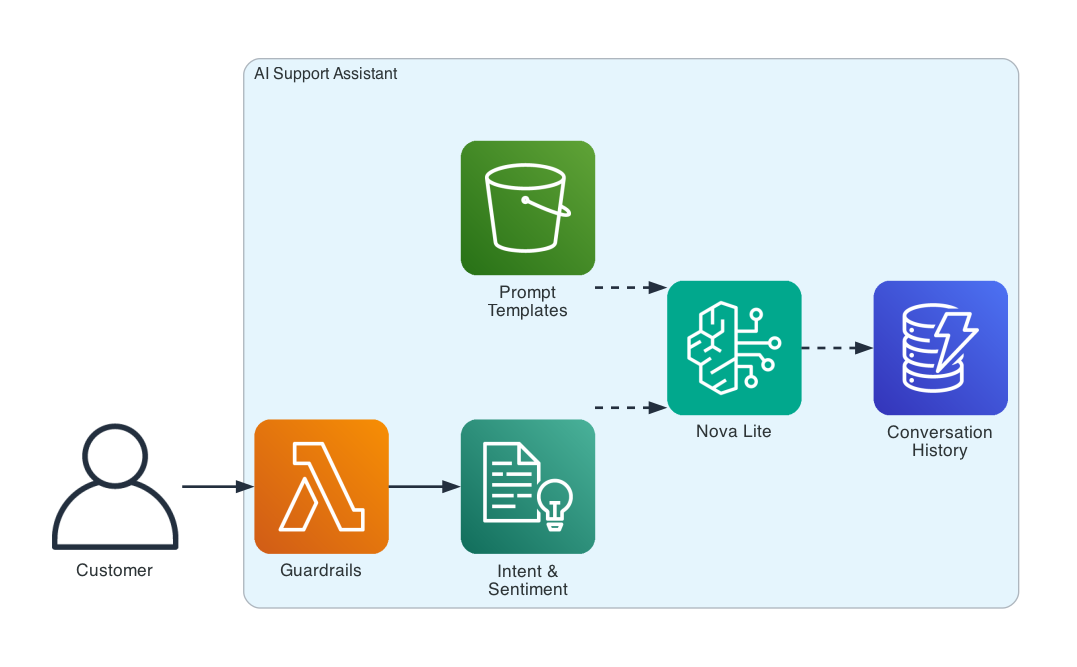
The assistant is a single pipeline: customer query → guardrails → intent detection → prompt building with persona and history → Nova Lite generation → output filtering → conversation storage.
How It Works — Six Phases
Phase 1: Prompt Management
The assistant has a defined persona — role, boundaries, tone, and response format. This isn’t a system prompt you paste into a chat window. It’s a versioned configuration that can be stored in S3, loaded at runtime, and updated without redeployment.
Persona: AWS Support Assistant
Role: You are a helpful AWS technical support assistant.
Boundaries:
  - Only answer questions about AWS services and cloud computing.
  - Do not provide financial advice, legal advice, or medical advice.
  - Do not share internal AWS information or pricing not publicly available.
  - If you don't know the answer, say so clearly and suggest contacting AWS Support.
Different intents get different prompt templates. A troubleshooting query gets a template that asks for step-by-step guidance. A vague query gets a template that asks clarifying questions. A handoff gets a template that summarizes the issue for the human agent.
Part 1’s PromptTemplateManager had one template with {variable} slots. This system has four templates, a persona definition, and version control.
Phase 2: Guardrails
Every input is checked before it reaches the model. Every output is checked before it reaches the customer.
Normal query: ✅ ALLOWED
  "How do I reset my password?"

Denied topic: 🚫 BLOCKED
  "What's the competitor pricing for Zendesk?"
  Reason: Denied topic detected: competitor pricing

PII in input: ✅ ALLOWED (FILTERED)
  "My SSN is 123-45-6789 and I need help"
  Filtered: "My SSN is [REDACTED-SSN] and I need help"

AWS key leak: ✅ ALLOWED (FILTERED)
  "My key is AKIAIOSFODNN7EXAMPLE"
  Filtered: "My key is [REDACTED-AWS_KEY]"
The guardrails catch denied topics (competitor pricing, internal roadmaps, medical/legal advice), detect and redact PII (SSNs, credit cards, AWS keys, emails, phone numbers), and filter problematic phrases from output.
Part 1’s ContentValidator did PII redaction with regex. This system adds topic detection, input/output separation, and AWS credential detection.
Phase 3: Intent Detection & Sentiment
Every query is classified by intent and sentiment before the prompt is built. This determines which template to use and whether to escalate.
Query                                              Intent             Sentiment
My invoice shows a charge I don't recognize         billing            negative
How do I add a new team member?                    how_to             neutral
Why is the dashboard loading so slowly?            troubleshooting    negative
I can't log into my account                        account            negative
Help                                               general            neutral
This is terrible, nothing works!                   general            negative
Low-confidence intents trigger clarification. Negative sentiment with escalation phrases triggers human handoff. The assistant adapts its behavior based on what it detects.
Phase 4: Multi-Turn Conversation
The assistant remembers what was discussed. Each conversation is stored with a TTL for automatic cleanup.
Turn 1:
  Customer: How do I upgrade my subscription plan?
  Assistant: To upgrade your plan, go to Settings → Billing → Change Plan.
             You'll see the available tiers with pricing. The upgrade takes
             effect immediately and you'll be prorated for the current month...

Turn 2:
  Customer: What about adding more team members on the new plan?
  Assistant: On the upgraded plan, you can add team members under
             Settings → Team → Invite. Each additional seat is billed
             monthly based on your plan tier...

Turn 3:
  Customer: Can you show me the pricing for that?
  Assistant: Here's the per-seat pricing for each plan tier:
             Starter: $10/seat/month, Professional: $25/seat/month,
             Enterprise: custom pricing...
Turn 2 understands “the new plan” because it has the conversation history. Turn 3 knows “that” refers to per-seat pricing. Without history, each turn would be a disconnected question.
Phase 5: Edge Case Testing
Six scenarios that test the assistant’s governance controls under pressure.
Scenario                    Result    Latency
Angry customer              ✅ PASS      922ms
Vague request               ✅ PASS     1575ms
Off-topic (denied topic)    ✅ PASS        0ms
PII in input                ✅ PASS     2100ms
Technical troubleshooting   ✅ PASS     3495ms
Multi-turn context          ✅ PASS     3844ms

Results: 6/6 passed
The angry customer gets routed to a human agent. The vague request gets a clarifying question. The off-topic query is blocked instantly (0ms — never reaches the model). PII is redacted before generation. Technical queries get step-by-step troubleshooting. Multi-turn queries use conversation context.
Phase 6: Fallback & Human Handoff
When the model fails or the customer demands a human, the assistant degrades gracefully.
Angry customer escalation:
  Intent: handoff
  Response: I understand your frustration, and I'm here to help.
            I'll connect you with a human agent who can assist you further.
            To give them a head start, your issue seems to be urgent
            and requires immediate personal attention...
The handoff includes a summary of the customer’s issue so the human agent has context. The customer never gets an error message or a blank screen.
What Changed from Part 1
| Concept | Part 1 (Insurance Claim Processor) | Part 6 (This Project) |
|---|---|---|
| Prompt management | PromptTemplateManager — Python class with {variable} slots |
Versioned persona + 4 intent-specific templates + S3 storage |
| Safety controls | ContentValidator — PII regex redaction |
Guardrails: topic detection, PII redaction, AWS key detection, output filtering |
| Conversation | Single-turn only | Multi-turn with DynamoDB history and TTL |
| Intent handling | None — same prompt for everything | Intent detection + sentiment analysis + routing |
| Error handling | Retry with backoff | Fallback responses + human handoff |
| Testing | None | Edge case framework: 6 scenarios, automated pass/fail |
Getting Started
Prerequisites: Python 3.10+, AWS CLI configured, Bedrock model access for Nova Lite.
git clone https://github.com/srikanthethiraj/ai-support-assistant.git
cd ai-support-assistant
python3 -m venv venv
source venv/bin/activate
pip install -r requirements.txt
Run the demo:
python demo.py --region us-east-1
You’ll see all six phases — prompt management, guardrails, intent detection, multi-turn conversation, edge case testing, and fallback/handoff.
No infrastructure to deploy for the local demo. The in-memory conversation store handles history without DynamoDB.
Tear Down
No infrastructure to tear down for the local demo. If you deployed the DynamoDB table for production use:
aws dynamodb delete-table --table-name assistant-conversations --region us-east-1
What’s Next
This is Part 6 of an 8-part series on building AI applications with AWS:
- Part 1 — Insurance Claim Processor: Bedrock basics, prompt templates, simple RAG
- Part 2 — Financial Services AI Assistant: benchmarking, circuit breakers, cross-region resilience
- Part 3 — Customer Feedback Pipeline: multimodal data processing
- Part 4 — RAG Knowledge Base: vector stores, embeddings, document chunking
- Part 5 — Advanced Search & Retrieval: hybrid search, reranking, query expansion
- Part 6 — AI Support Assistant with Governance (this post): guardrails, prompt management, conversation flows
- Part 7 — Multi-Agent Support System: Strands Agents, multi-agent orchestration
- Part 8 — Deploy AI Agents on AWS: Bedrock Agents vs AgentCore
Repository: github.com/srikanthethiraj/ai-support-assistant
I’m Srikanth — a cloud engineer at AWS based in Austin, Texas. I learn by building, and I write about what I build. Follow along on this blog or connect with me on LinkedIn.
Comments